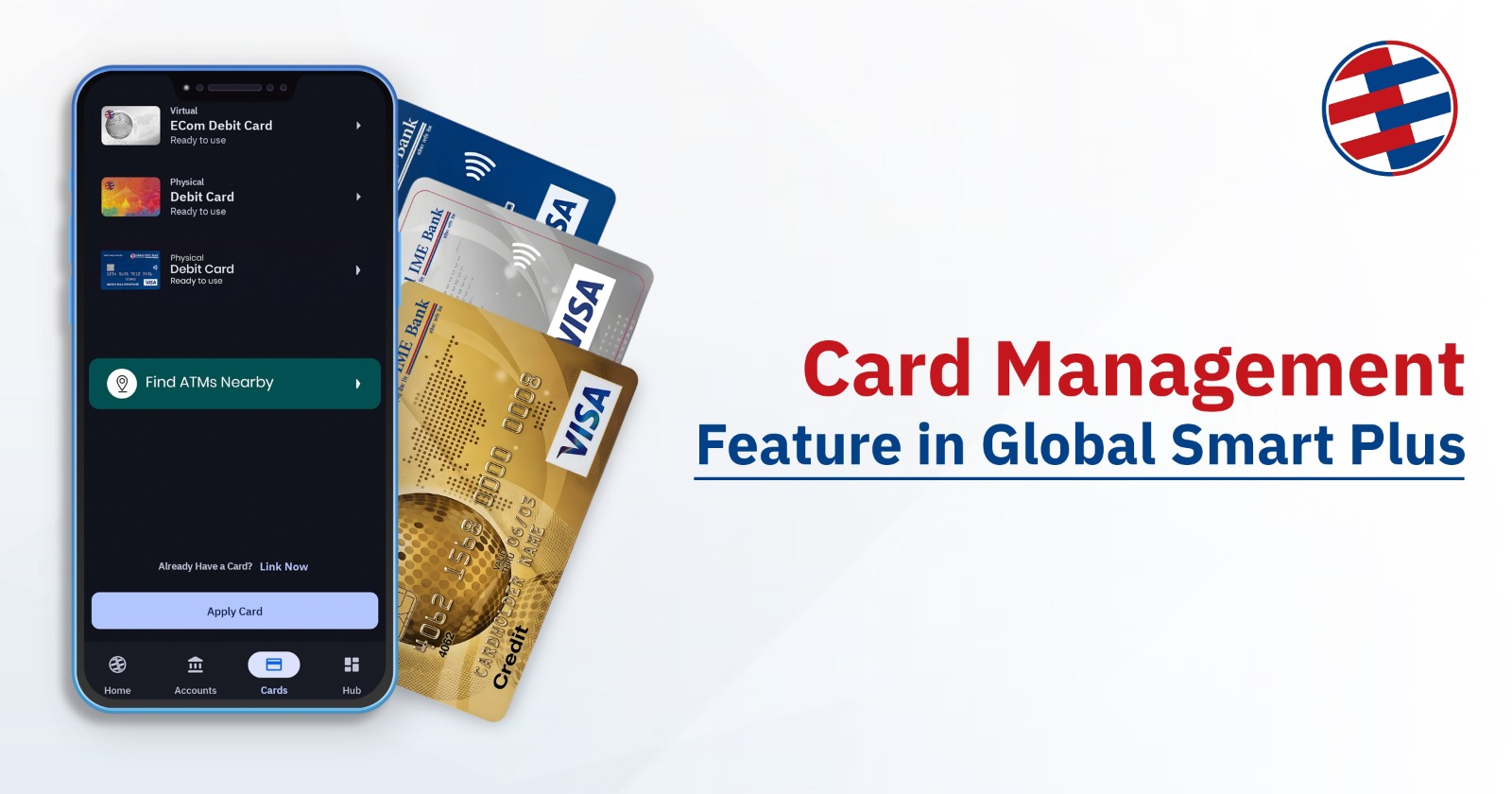
Managing cards is now easier with Global Smart Plus. Whether you’re applying for a new debit card, requesting a credit card, or simply checking your transaction history, everything is designed to be smooth, secure, and user-friendly. From viewing your CVV securely to blocking your card instantly, every feature is built around making your banking smarter.
This guide lets you know every step—from requesting cards to managing them—so you can make the most out of your digital banking experience.
Why Card Management Matters in Digital Banking
Card management is more than just using a card. It’s about control, safety, and convenience in today’s digital world.
Why It Matters
- Instant Access → Users can block cards anytime.
- Security First → Lost card? Block it instantly to prevent misuse.
- Transparency → View statements and track transactions in real time.
- Trust → Builds confidence in digital banking by reducing risks.
- Convenience → All actions are available from Global Smart Plus app, no branch visit required.
Steps for Applying Global IME Cards
This feature is available for customers with an account in Global IME Bank. Customers can apply for debit card as well as other cards like Ecom card, Credit card.
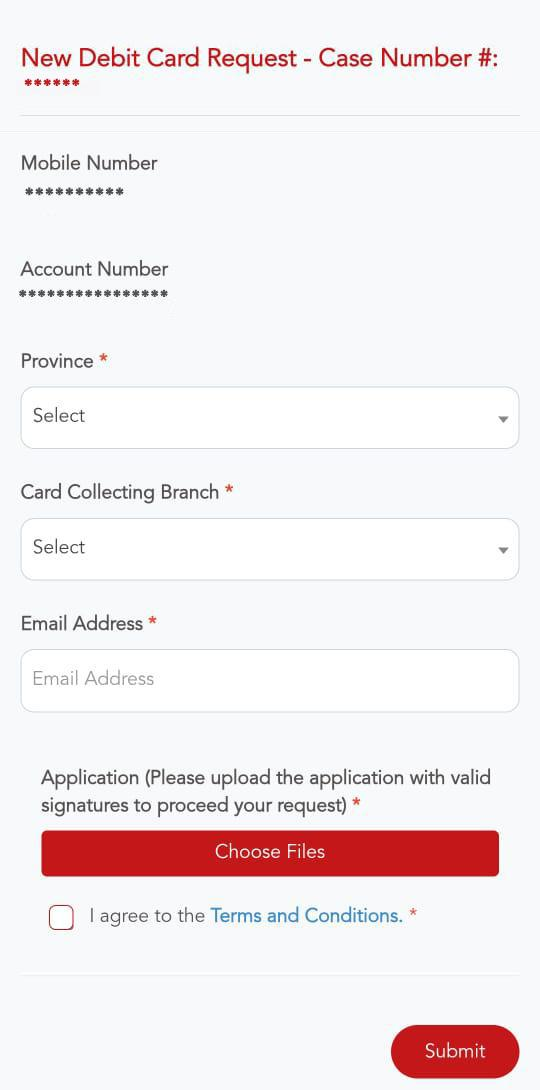
- Case Number
- A unique case number is automatically assigned to your request.
- Account Details
- Your registered mobile number and bank account number are shown (not editable).
- Next Steps
- You then proceed to fill in the required input fields depending on the card type.
For New Debit Card Request
- Select Province.
- Choose Card Collecting Branch.
- Enter Email Address.
- Upload the signed application file.
- Tick “I agree to the Terms and Conditions.”
- Click Submit.
Credit Card Request
- Confirm Account Number.
- Select Credit Card Application Type (Normal or Lien against Fixed Deposit).
- Fill in Name, Date of Birth (AD & BS), Mobile, Email.
- Select Residential Status, Dependents, Nationality.
- Choose Delivery Mode (Home or Branch).
- Provide Income Source, Monthly Income, Occupation details, Vehicle, Loan History.
- Select Card Type, Reference, Payment Option.
- Review and Submit.
After submitting all the info, you will see the amount approved for the credit limit. Then enter the desired Credit Card Limit. Then click Yes to proceed, and click the submit button.
The following are the required documents for the application for credit card:
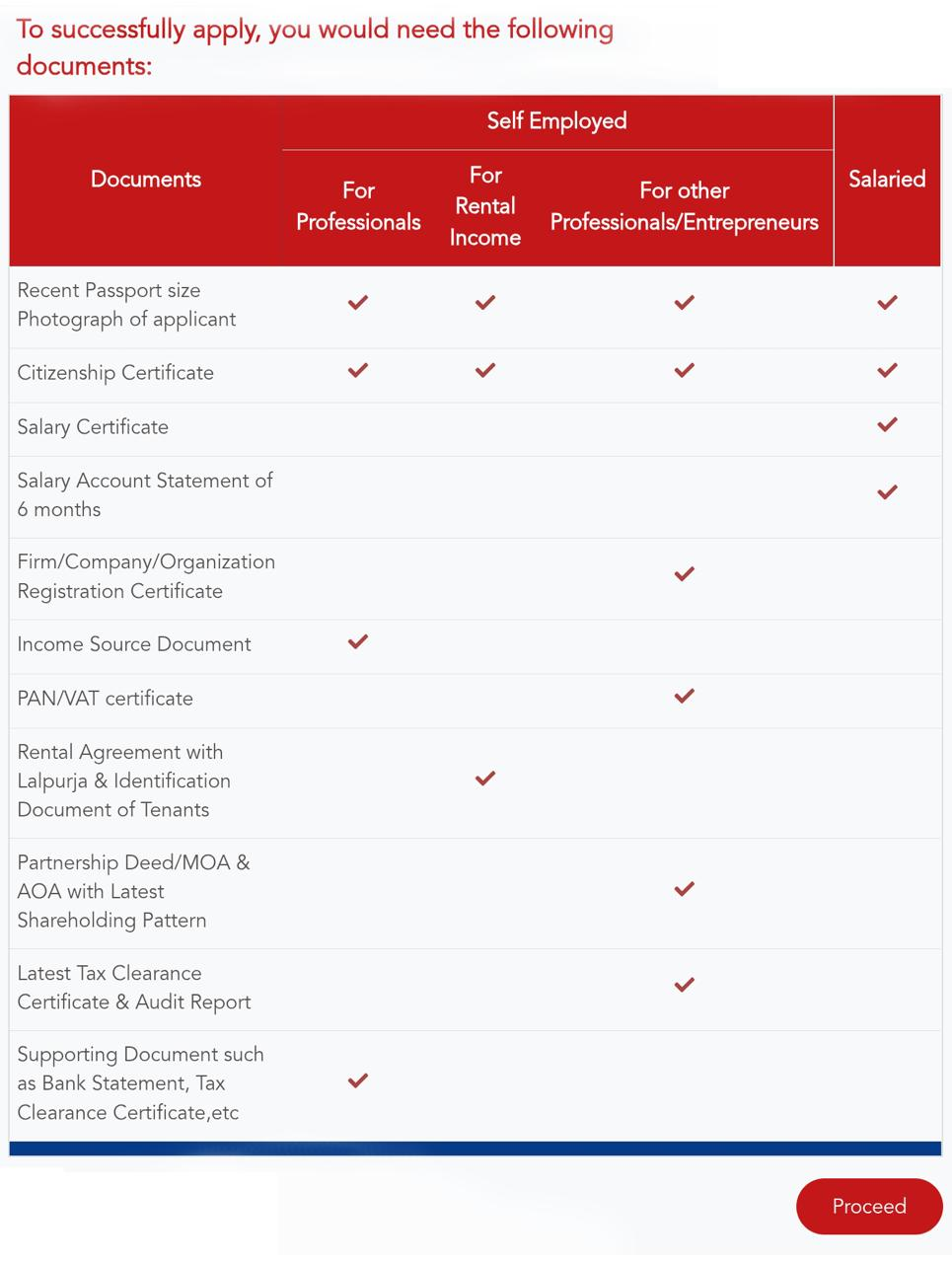
Submit all the required documents.
E‑com Card Request
- Enter Full Name, Date of Birth, Email, Nationality.
- Provide ID Number, Issuance Date, Issuance Place.
- Enter PAN Number.
- Select Card Type (Virtual – NPR 500, Physical – NPR 600).
- Upload PAN Card copy.
- Tick “I agree to the Terms and Conditions.”
- Click Submit.
Manage the Cards of Global IME Bank
Managing the cards of Global IME Bank is easier as users can see all their existing cards on a mobile app. The things we can do with this feature are:
- View CVV → Lets you reveal the card’s CVV code for transactions. CVV can be seen after entering the OTP sent to the registered user sim card.
- Add Money → Option to load funds into the card balance (for E-Com card).
- Block → Immediately disable the card if lost or compromised.
- Card Statement/Download → Access and download your transaction history.
- Limits → Check spending and withdrawal limits.
- Green PIN → Activate green pin for changing card pin.
Tips for Safe and Smart Card Usage
Using your card wisely is just as important as having the right features. Following are the tips you should keep in mind for safe card usage:
- Always keep your OTPs confidential
- Monitor transactions regularly
- If a card is lost then block your card and contact support.
- Use your own card for withdrawal
Digital banking is powerful, but only when used responsibly. With the right habits, you can enjoy convenience without compromising security.
Conclusion
Global Smart Plus makes it easier to manage your cards. From applying for debit, credit, and E-com card , the platform offers a seamless and secure experience. It puts control in your hands literally.
Instead of visiting branches or waiting in queues, you can apply cards from your mobile device. That’s the future of banking fast, simple, and fully digital.
FAQs
1. How long does it take to get a card after applying?
It usually depends on the type of card and verification process, but digital requests are processed faster than traditional methods.
2. Can I change my credit limit after approval?
Yes, you can request changes, but it depends on your eligibility and bank policies.
3. Is the CVV visible anytime?
No, it is only visible after OTP verification for security reasons.
4. What should I do if I lose my card?
Immediately use the block feature in the app to prevent unauthorized use.
5. Can I apply for multiple cards through Global Smart Plus?
Yes, you can apply for debit, credit, and E-com card based on your needs. However, a supplementary card of the same type isn’t available.